# Accept card payments
Follow this step by step guide to set up card acceptance for your merchants using our API or SDKs. Link debit and credit cards to a Moov account and use the card of your choice as the source of a payment transfer.
Linking a card to a Moov account automatically verifies the card details with the card networks. This process verifies the existence of the card account and returns information about the Address Verification Service (AVS) and Card Verification Value (CVV) checks that occur.
Some examples of card acceptance use cases include:
- An e-commerce platform that allows buyers and sellers to transact
- A software-as-a-service (SaaS) platform connecting service providers with clients
- A utility or subscription based company looking to allow their customers different payment options
For the purpose of this guide, we assume that you've already onboarded your merchants. To learn more about onboarding merchants, read our [create accounts](/guides/accounts/create-accounts/) or [hosted onboarding](/guides/accounts/hosted-onboarding/) guide.
## [Link card to Moov account](#link-card-to-moov-account)
You can use the pre-built [card link Drop](/moovjs/drops/card-link/), or if you've submitted an attestation of PCI compliance to Moov, you can link cards directly through the API. If you opt for the API method, you'll be responsible for storing and handling card data.
### [Save a card for future use](#save-a-card-for-future-use)
Before you link a card, consider whether the card should be saved on file to use Moov's [card account updater](/guides/sources/cards/card-account-updater/) service. This can be done by setting `cardOnFile` to **true** when linking a card. If nothing is passed to `cardOnFile`, or you set it to **false**, the card will not automatically update card number and expiration date information. If a card becomes out of date, it will not work for future payments.
If you set the `cardOnFile` flag to **true**, the `merchantAccountID` (Moov account ID of a merchant on your platform) provided should signify which merchant the cardholder has consented to save their information. The account associated with the `merchantAccountID` will incur fees for successful card updates using Moov's card account updater.
If you leave the `merchantAccountID` field blank while saving a card on file, the system will default to your platform's account ID, indicating the cardholder's relationship with your platform's brand. You can update the `merchantAccountID` at any time using the update card `PATCH` [endpoint](/api/sources/cards/update/).
Accounts must be approved for card account updater. [Contact Moov](https://support.moov.io/) for more information.
### [Drop](#drop)
The simplest way to securely collect sensitive card details is by using the card link Drop, a prebuilt UI component for embedding card-based payments. By using the [card link Moov Drop](/moovjs/drops/card-link/), you’ll send card data directly to Moov’s PCI-compliant card vault, and the information will not touch your servers.
Once the information has been submitted via the Drop, Moov verifies the card details with card networks.
```
1
2
3
4
5
6
7
8
9
10
11
12
13
14
15
16
17
18
```
```html
```
### [API & SDKs](#api--sdks)
Link a card using our API or Go SDKs. If you set the optional `X-Wait-For` header to `payment-method`, the response will include any payment methods that were created for the newly linked card in the `paymentMethods` field.
[cURL](#tab-946158327-2-0) [Go SDK](#tab-946158327-2-1)
```
1
2
3
4
5
6
7
8
9
10
11
12
13
14
15
16
17
18
19
20
```
```zsh
curl -X POST "https://api.moov.io/accounts/{accountID}/cards" \
-H "Authorization: Bearer {token}" \
-H "X-Wait-For: payment-method" \
-H "x-moov-version: v2024.01.00" \
--data-raw '{
"billingAddress": {
"addressLine1": "123 Main Street",
"city": "Denver",
"stateOrProvince": "CO",
"postalCode": "80301",
"country": "US"
},
"cardCvv": "123",
"cardNumber": "4111111111111111",
"expiration": {
"month": "01",
"year": "28"
},
"holderName": "Jules Jackson"
}'\
```
```
1
2
3
4
5
6
7
8
9
10
11
12
13
14
15
16
17
18
19
20
21
22
```
```go
mc, _ := moov.NewClient()
var accountID string
cardPayload := moov.CreateCard{
BillingAddress: moov.Address{
AddressLine1: "123 Main Street",
City: "Denver",
StateOrProvince: "CO",
PostalCode: "80301",
Country: "US",
},
CardNumber: "4111111111111111",
CardCvv: "123",
Expiration: moov.Expiration{
Month: "01",
Year: "28",
},
HolderName: "Jules Jackson",
}
mc.CreateCard(ctx, accountID, cardPayload)
```
## [Card verification](#card-verification)
When a card is linked, Moov performs a verification with the relevant card network to confirm that the card account is open and valid. Additionally, the verification checks if the CVV and address match the information on file with the card issuer.
The `merchantAccountID` is used to pass merchant information during card verification. Although these verification transactions are rarely visible to cardholders, when they are, it's crucial that cardholders recognize the merchant associated with the verification so they know it's not fraudulent.
Although it's best practice to always include the `merchantAccountID` during card verification, it's not mandatory. If you omit this field, the system defaults to your platform's account ID.
It is possible the verification request will be declined by the card issuer. Decline information is provided in the response body of the `422` error. Errors could be validation errors, such as an invalid card number, or actual declines from the card issuer. Below is an example of a card issuer decline.
```
1
2
3
```
```json
{
"error": "card verification failure: card-not-activated"
}
```
## [Name verification (optional)](#name-verification-optional)
Moov supports Visa’s [Account Name Inquiry (ANI)](https://usa.visa.com/content/dam/VCOM/regional/na/us/support-legal/documents/account-name-inquiry-onesheet-merchant-version.pdf). ANI ensures that the name provided on the linked card matches the name held on file with the issuer. This tool is optional and serves to enhance cardholder verification.
The card link `POST` [endpoint](/api/sources/cards/create/) and `PATCH` [endpoint](/api/sources/cards/update/) offer an optional `verifyName` field. To submit a name to Visa for verification, supply the `holderName` and set `verifyName` to **true**. [Pull from card](/guides/money-movement/accept-payments/pull-from-card/) requires name verification.
```
1
2
3
4
5
6
7
8
```
```json
{
"cardVerification": {
"fullName": "match", // noMatch, match, partialMatch, notChecked
"firstName": "match", // noMatch, match, partialMatch, notChecked
"middleName": "noMatch", // noMatch, match, partialMatch, notChecked
"lastName": "match" // noMatch, match, partialMatch, notChecked
},
}
```
## [Submit the card payment](#submit-the-card-payment)
The customer’s card will be the source of funds, so Moov needs the `card-payment` payment method from their account. You can obtain the `paymentmethodID` from the payment methods `GET` [endpoint](/api/sources/payment-methods/list/). The `sourceID` should be the `cardID`, which you can get from the cards `GET`[endpoint](/api/sources/cards/get/).
Since the merchant’s wallet will be the destination of the funds, we will need the `moov-wallet` payment method. You can obtain the paymentmethodID using the payment methods `GET` [endpoint](/api/sources/payment-methods/list/) and finding the `moov-wallet` payment method associated with the merchant account.
To submit the card payment, create a transfer from the cardholder (source) to the merchant (destination).
[cURL](#tab-871592634-0-0)
```
1
2
3
4
5
6
7
8
9
10
11
12
13
14
15
16
17
18
```
```zsh
curl -X POST "https://api.moov.io/accounts/{accountID}/transfers" \
-H "Authorization: Bearer {token}" \
-H "X-Idempotency-Key: UUID" \
-H "X-Wait-For: rail-response" \
-H "x-moov-version: v2024.01.00" \
--data-raw '{
"amount": {
"value": 100,
"currency": "USD"
},
"destination": {
"paymentMethodID": "UUID"
},
"source": {
"paymentMethodID": "UUID"
},
"description": "Optional transaction description."
}'\
```
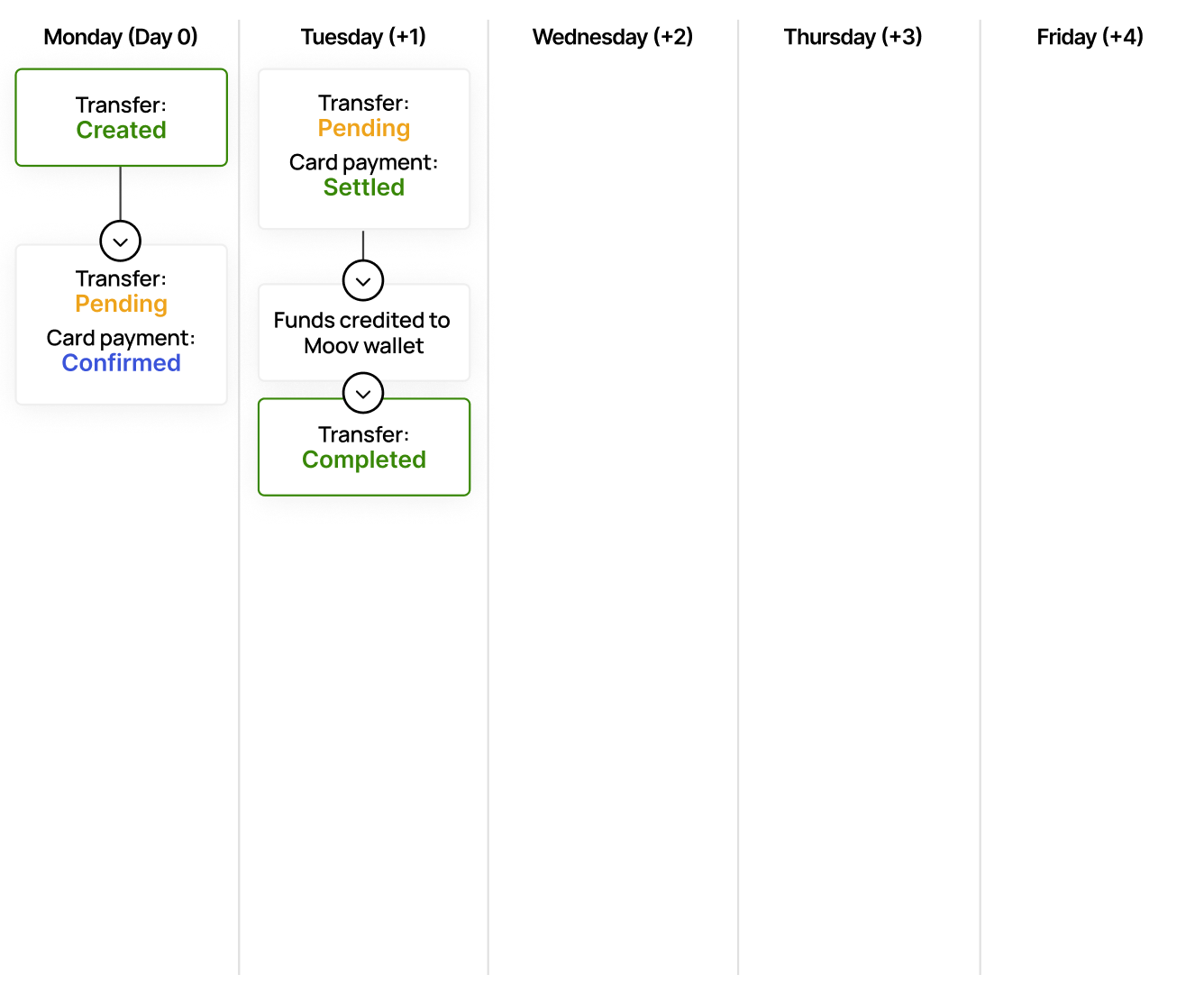
Card-based payments first settle in a Moov wallet. The funds can later be moved to an external bank account through a disbursement transfer.
When you include the `X-Wait-For` header in the request, you will get a synchronous response that includes full transfer and rail-specific details from the payment network. This is useful for when a user is clicking a button to make a payment and needs a synchronous response so they can get confirmation that it worked. If you omit the `X-Wait-For` header, you will get an asynchronous response that only includes the transferID and the timestamp for when the transfer was created.
## [Check status](#check-status)
After a transfer is created, it will be `pending` until the funds are disbursed to the destination `moov-wallet`. Funds typically settle and become available by the end of the next business day. You can check the [status](/guides/money-movement/events-and-statuses/#transfer-statuses) of the transfer anytime using the `GET` [endpoint](/api/money-movement/transfers/get/).
You can also see card specific status details in the response within the `source.cardDetails` object.
```
1
2
3
4
5
6
7
8
```
```json
{
"source": {
"cardDetails": {
"status": "confirmed",
"confirmedOn": "2023-09-10T18:23:56Z"
}
}
}
```
## [Access funds](#access-funds)
Once the payment has been processed and the funds are available, the funds can be moved out of the merchant `moov-wallet` using another transfer where that wallet is the source. [Bank holidays](https://www.frbservices.org/about/holiday-schedules) may delay the availability of funds.
[Card to wallet](#tab-284965371-0-0)
## [Cardholder disputes](#cardholder-disputes)
As the main account holder, you are responsible for notifying impacted merchants of any incoming disputes. You can receive notifications about incoming disputes by setting up the `dispute.updated` webhook. Read our [webhooks](/guides/webhooks/webhook-events/#disputes) guide for more information.
If you receive a `202` response from creating a transfer, do not consider the transfer as successful or failed. Instead, you should wait for the webhook notification to determine the status of the transfer, or subsequently look up the transfer status using the `transferID`. Read more on our [transfer responses](/guides/money-movement/events-and-statuses/#transfer-responses) guide.
## [Reverify a card](#reverify-a-card)
Moov will only perform a new verification request if a new CVV is provided.
You can use the update a card `PATCH` [endpoint](/api/sources/cards/update/) to update and re-verify certain information about the card. The `cardID` is the ID of the card you want to update, and the `accountID` represents the Moov account that the card is linked to.
```
1
2
3
```
```json
{
"cardCvv": "123"
}
```
Optional request data:
| Field | Type | Description |
|------------------|--------|----------------------------------------------|
| `expiration` | object | The card's expiration month and year |
| `cardCvv` | string | The card's CVV number |
| `billingAddress` | object | The billing address associated with the card |
Note that when performing a `PATCH` on an existing card, Moov will perform another CVV verification request to the card networks using the new information provided. If the new verification is declined by the card issuer, the previously linked card will not be affected. If the verification succeeds, the card record will be updated with the new information.
Refer to the `cardVerification{}` object in the response to see if the new CVV information is correct.
```
1
2
3
4
5
6
7
```
```json
{
"cardVerification": {
"cvv": "match",
"addressLine1": "match",
"postalCode": "match"
}
}
```
## [Best practices](#best-practices)
Some card issuers display alerts or notifications about card verifications to cardholders. Being transparent and recognizable prevents accidental suspicion.
Include as much complete and accurate data as possible to comply with card brand rules and mandates, optimize card authorization rates, prevent interchange downgrades, and increase defensibility against chargebacks. Consider the following best practices:
- **Street address**: Send the optional `addressLine1` in `billingAddress`. For most situations, Moov recommends sending the address so that full address verification can take place. Not including `addressLine1` may impact approval rates, cause interchange downgrades, and impact chargeback win rate.
- **Card verification**: Always include `merchantAccountID` when performing a card verification. This provides context to the cardholder if the verification transaction becomes visible.
- **Save a card on file**: If you're saving a card for future use, specify `merchantAccountID` and set the `cardOnFile` flag to **true**. This indicates the cardholder's relationship with the merchant, and their consent to save their card details for future transactions.