# Link payment methods UI
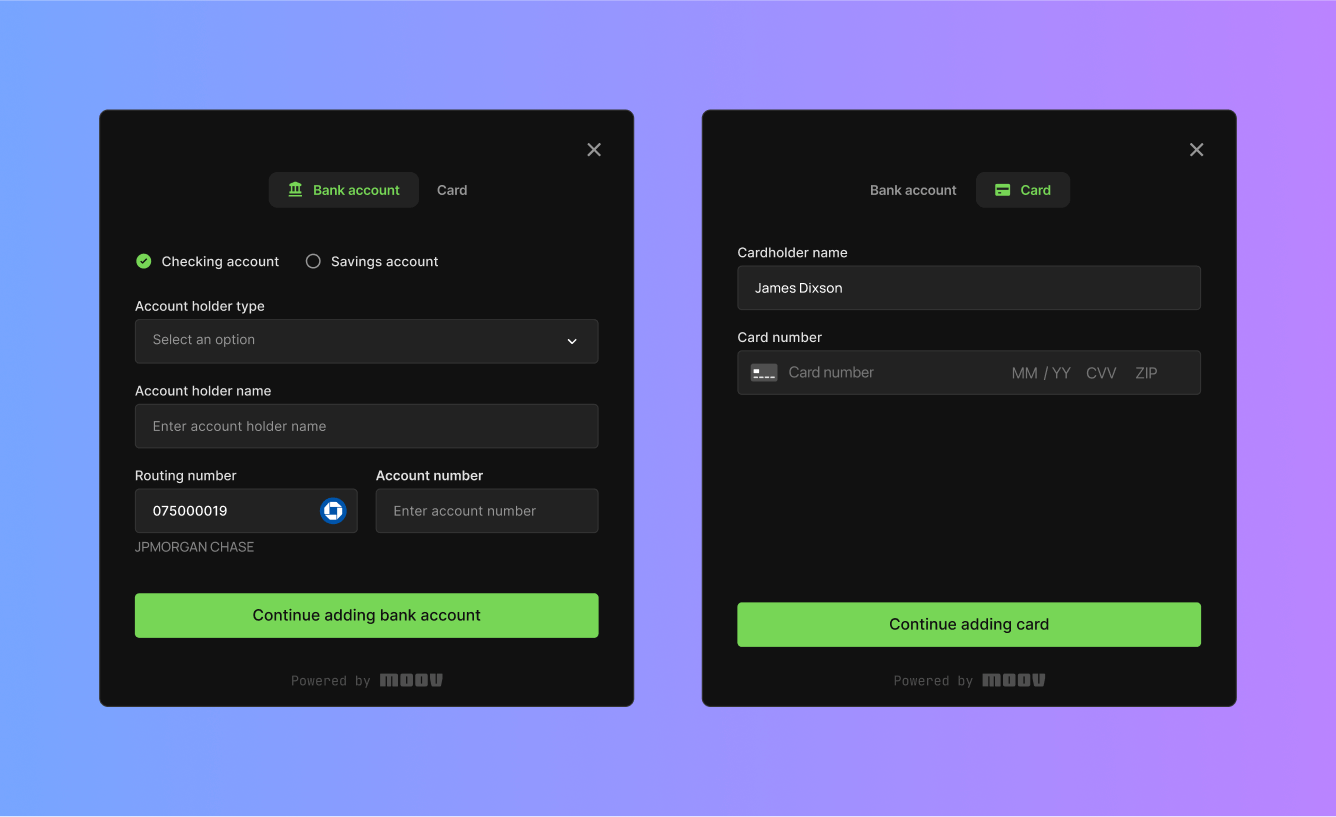
Implement a pre-built user interface for registering new payment methods.
With the `moov-payment-methods` drop, you can easily allow end users to register new payment methods with their existing Moov account.
The payment methods Drop interacts directly with the link a card `POST` [endpoint](/api/sources/cards/create/) and the link a bank account `POST` [endpoint](/api/sources/bank-accounts/create/) using JWTs to securely send data between your end user's browser and Moov.
If you want to set up payment methods on a new Moov account, use the [moov-onboarding](/moovjs/drops/onboarding/) drop, which flows straight into payment methods after an account is created. Note that you can configure your payment method flow to support both card acceptance and bank accounts or just one of them.
```
1
```
```html
```
Visit our [Drops 101](/moovjs/drops/drops-101/) guide to learn the basics of properties, attributes, and initializing Drops.
Moov Drops require a secure HTTPS connection. If you don't have a test environment with HTTPS enabled, we suggest setting up a hosting environment with ngrok, Netlify, or Vercel.
## [Properties](#properties)
Properties can be accessed through JavaScript using a reference to the `moov-payment-methods` element.
| Property | Type | Description |
|----------------------|-----------|---------------------------------------------------------------------------------------------------------------------------------------------------------------------------------------------------------------------------------------------------------------------------------------------------------------|
| `token` | String | Auth Token used for hitting the API. See the `Scopes` section for more detail. |
| `accountID` | String | The ID of the Moov user account to which the payment method will be added. |
| `open` | Boolean | Whether or not the dialog is currently displayed to the user. |
| `onResourceCreated` | Function | Callback fired when the dialog creates a new resource (account, payment method, etc). Use this callback to update your token with the appropriate scopes before creating the next resource. See the [Scopes](/moovjs/drops/payment-methods/#scopes) section for more detail. |
| `onError` | Function | Callback fired when the dialog encounters an error. |
| `onCancel` | Function | Callback fired when the user attempts to close the dialog. |
| `onSuccess` | Function | Callback fired when the user links a payment method. Responds with a card or bank account which can be accessed in the function. See the link card [endpoint](/api/sources/cards/create/#response) or the link bank account [endpoint](/api/sources/bank-accounts/create/#response) response for more detail. |
| `plaid` | Object | A Plaid configuration object. Used for setting up a payment method through Plaid. |
| `onPlaidRedirect` | Function | Callback fired after following a redirect from Plaid. Provides a `restoredProperties` object which can be used to restore the state of the drop. |
| `paymentMethodTypes` | String\[] | An array of allowed payment method types. Possible values are `card` or `bankAccount`. |
| `allowedCardBrands` | String\[] | An array of allowed card brands. If this field is not provided, all card brands will be accepted. Accepted values are `visa`, `mastercard`, `american-express`, `diners-club`, `discover`, `jcb`, `unionpay`, `maestro`, `mir`, `elo`, `hiper`, or `hipercard`. |
| `microDeposits` | Boolean | If false, hides the micro deposit verification step when adding a payment method. Defaults to `true`. |
### [How to set a property](#how-to-set-a-property)
[token](#tab-413879562-3-0) [onError](#tab-413879562-3-1)
```
1
2
```
```js
const paymentMethods = document.querySelector('moov-payment-methods');
paymentMethods.token = 'eyjh...';
```
```
1
2
3
4
5
```
```js
const paymentMethods = document.querySelector('moov-payment-methods');
paymentMethods.onError = ({ errorType, error }) => {
console.log(errorType); // "bankAccount", "plaid", etc
console.error(error); // Error message
};
```
## [Attributes](#attributes)
String-type properties can be set via attributes on the HTML `` element.
| Attribute | Description |
|--------------|--------------------------------------------------------------------------------|
| `token` | Auth Token used for hitting the API. See the `Scopes` section for more detail. |
| `account-id` | The ID of the Moov user account to which the payment method will be added. |
## [Scopes](#scopes)
To add a payment method, your Moov API token must include the following scopes.
- `/fed.read`
- `/accounts/{accountID}/cards.read`
- `/accounts/{accountID}/cards.write`
- `/accounts/{accountID}/bank-accounts.read`
- `/accounts/{accountID}/bank-accounts.write`
## [Using Plaid for instant account verification](#using-plaid-for-instant-account-verification)
Instead of using micro-deposit verification which can take up to a few days to complete, you can use Plaid directly from Moov Drops to add new bank accounts.
To use Plaid, you must pass a configuration object into the `plaid` and `onPlaidRedirect` properties of the `moov-payment-methods` drop.
#### [Plaid configuration object parameters](#plaid-configuration-object-parameters)
| Name | Type | Description |
|---------------------------|--------------------------------------------------|------------------------------------------------------------------------------------------------------------------------------------------------------------------------------------------------------------------------------------------------------------------------------|
| `env` | `"sandbox"` or `undefined` | Plaid environment. Use `"sandbox"` for testing. Use `undefined` for production. |
| `redirectURL` | URL string | If Plaid forces the user to a bank's website, they will eventually return to this url. Must be a webpage on your current domain. [Contact Moov](https://support.moov.io/) and include the `redirectURL` to get it registered in the Plaid dashboard. |
| `receivedRedirectUri` | URL string | URL of the current page. Will be a combination of your `redirectURL` and query parameters set by Plaid. |
| `token` | String | Optional. For Moov customers who manage their own Plaid integration. Create a Plaid `link_token` and enter it here to bypass the Moov-managed Plaid request. See [Plaid documentation](https://plaid.com/docs/auth/partnerships/moov/#create-a-link_token) for more details. |
| `onSuccess` | (moovBankAccount) => void | Optional. Callback function executed when Plaid successfully links a bank account to Moov. Moov bank account object is passed as a parameter. |
| `onExit` | (err, metadata) => void | Optional. Callback function executed when the user exits the Plaid flow. |
| `onEvent` | (eventName, metadata) => void | Optional. Callback function executed on each Plaid event. |
| `onLoad` | () => void | Optional. Callback function executed when Plaid loads. |
| `onProcessorTokenRequest` | (public\_token, bank\_account\_id) => Promise | Optional. For Moov customers who manage their own Plaid integration. When this callback fires, use your existing Plaid integration to convert the given `public_token` and `bank_account_id` into a `processor_token` and return it. |
[Basic](#tab-237465981-5-0) [Redirect handling](#tab-237465981-5-1) [BYO Plaid](#tab-237465981-5-2)
```
1
2
3
4
5
6
7
8
9
10
11
```
```js
const paymentMethods = document.querySelector('moov-payment-methods');
paymentMethods.token = "eyj...";
paymentMethods.accountID = "abc123...";
paymentMethods.plaid = {
env: "sandbox",
redirectURL: "https://yoursite.com/plaidredirecturl",
onExit: (...args) => console.log("on plaid exit", ...args),
onEvent: (...args) => console.log("on plaid event", ...args),
onLoad: (...args) => console.log("on plaid load", ...args),
onSuccess: (...args) => console.log("on plaid success", ...args),
};
```
```
1
2
3
4
5
6
7
8
9
10
11
12
13
14
15
16
17
```
```js
const paymentMethods = document.querySelector('moov-payment-methods');
paymentMethods.token = "eyj...";
paymentMethods.accountID = "abc123...";
paymentMethods.plaid = {
env: "sandbox",
redirectURL: "https://yoursite.com/plaidredirecturl",
// After following a Plaid redirect, we pass the new URL here
receivedRedirectUri: window.location.href.includes("?oauth_state_id")
? window.location.href
: undefined,
};
// After following Plaid redirect, restore the drop to its previous state
paymentMethods.onPlaidRedirect: (restoredProperties) => {
paymentMethods.token = restoredProperties.token;
paymentMethods.accountID = restoredProperties.accountID;
paymentMethods.open = restoredProperties.open;
};
```
```
1
2
3
4
5
6
7
8
9
10
11
12
13
14
15
```
```js
const paymentMethods = document.querySelector('moov-payment-methods');
paymentMethods.token = "eyj...";
paymentMethods.accountID = "abc123...";
paymentMethods.plaid = {
env: "sandbox",
redirectURL: "https://yoursite.com/plaidredirecturl",
// Pre-existing Plaid customers pass their own token here:
token: "plaid_eyj123-the-token-you-requested-from-plaid",
// Pre-existing Plaid customers convert Plaid data into a Moov processor token here:
onProcessorTokenRequest: (public_token, bank_account_id) => {
return fetch(`/your-processor-token-endpoint?pt=${public_token}&bai=${bank_account_id}`)
.then((res) => res.json())
.then(({ processor_token }) => processor_token);
},
};
```
## [Theming](#theming)
Read our [themes](/moovjs/drops/theming/) guide to learn how to re-style Moov Drops.