# Install & authenticate
Install, authenticate, and initialize Moov.js in your application.
After installation, you'll generate a token server-side to communicate between Moov and your account. You'll also set [scopes](/api/authentication/scopes/) to make API calls from Moov.js.
## [Install](#install)
Include Moov.js in your application by loading the Moov.js script, or downloading the Moov.js package via [npm](https://www.npmjs.com/package/@moovio/moov-js?activeTab=readme).
[Script tag](#tab-635847921-1-0) [npm](#tab-635847921-1-1)
```
1
```
```html
```
```
1
```
```zsh
npm i @moovio/moov-js
```
## [Authenticate](#authenticate)
For each action you take with Moov.js, you'll need a unique short lived access token that contains information needed to securely communicate with your Moov account.
You must generate tokens from your server-side application. Once you’ve generated a token, send it back to your client to use with Moov.js.
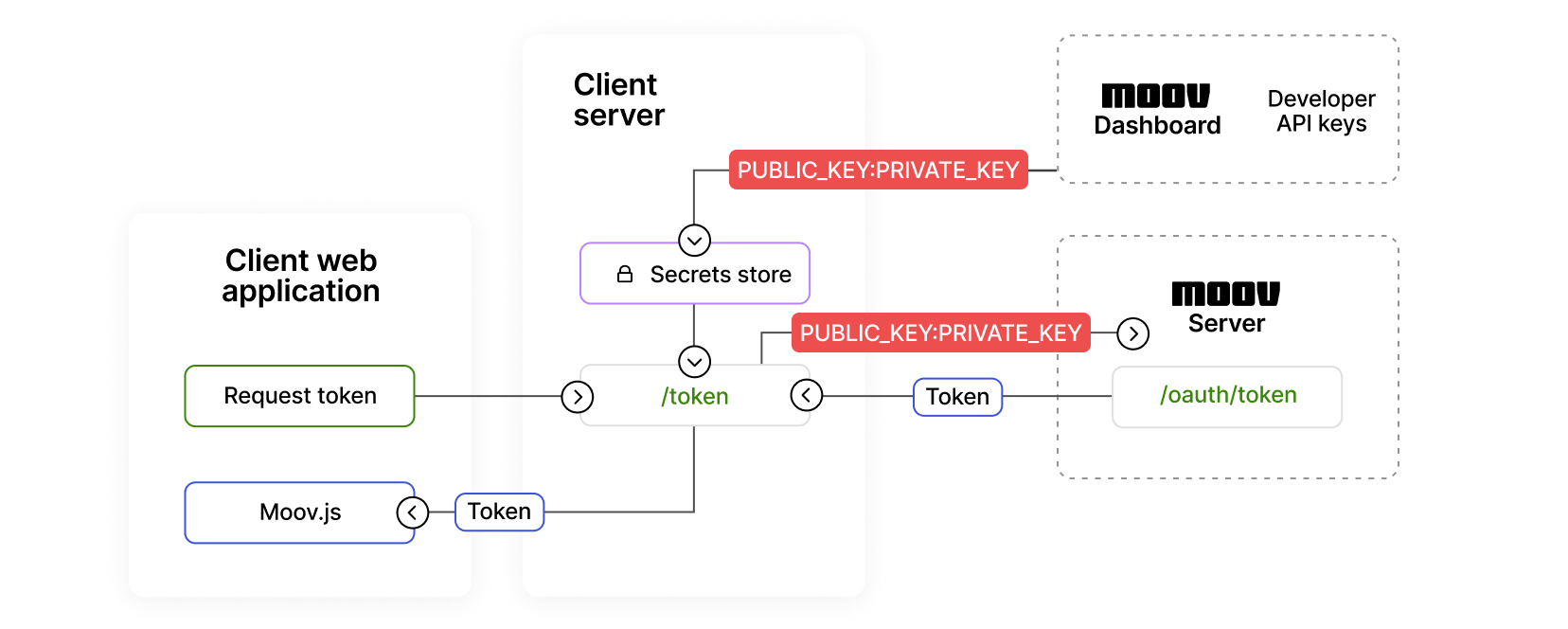
### [Create an access token](#create-an-access-token)
The examples below create an access token with a scope set to create an account. See the [scopes](/api/authentication/scopes/) documentation for more information.
[cURL](#tab-325749618-3-0)
```
1
2
3
4
5
6
7
8
9
```
```zsh
curl -X POST "https://api.moov.io/oauth2/token" \
-u "PUBLIC_KEY:PRIVATE_KEY" \
--data '{
"grant_type":"client_credentials",
"client_id":"5clTR_MdVrrkgxw2",
"client_secret":"dNC-hg7sVm22jc3g_Eogtyu0_1Mqh_4-",
"scope":"/accounts.write",
"refresh_token":"i1qxz68gu50zp4i8ceyxqogmq7y0yienm52351c6..."
}'\
```
## [Initialize](#initialize)
Once you've generated a token from your server, initialize Moov.js in the browser by passing the token to Moov.
[Script installation](#tab-736548129-4-0) [npm installation](#tab-736548129-4-1)
```
1
2
3
```
```html
```
```
1
2
3
4
```
```javascript
import { loadMoov } from '@moovio/moov-js';
const moovAccessToken = await fetch(...);
const moov = await loadMoov(moovAccessToken);
```
## [Next steps](#next-steps)
- Learn what [scopes](/api/authentication/scopes/) are available for Moov.js actions
- Check out Moov.js [Drops](/moovjs/drops/), a collection of UI components