Install & authenticate
After installation, you'll generate a token server-side to communicate between Moov and your account. You'll also set scopes to make API calls from Moov.js.
Install
Include Moov.js in your application by loading the Moov.js script, or downloading the Moov.js package via npm.
<script type="text/javascript" src="https://js.moov.io/v1"></script>
npm i @moovio/moov-js
Authenticate
For each action you take with Moov.js, you'll need a unique short lived access token that contains information needed to securely communicate with your Moov account.
You must generate tokens from your server-side application. Once you’ve generated a token, send it back to your client to use with Moov.js.
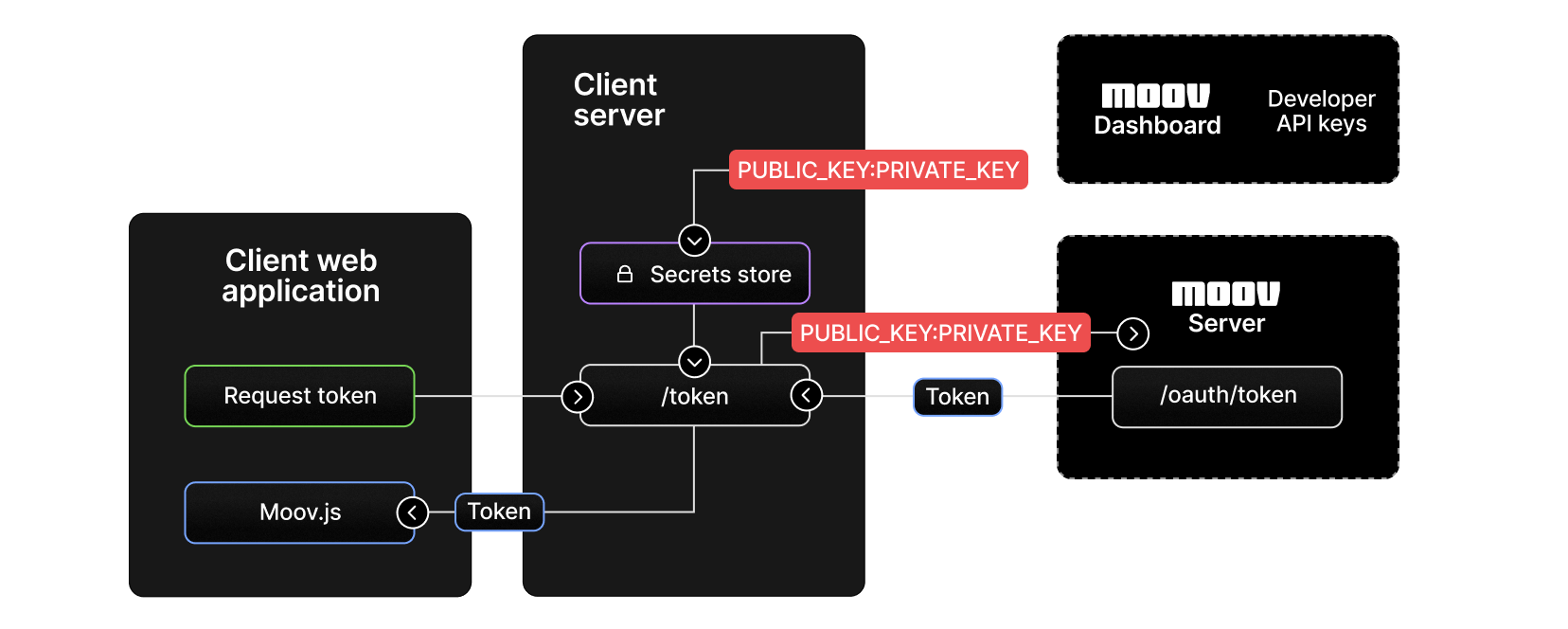
Create an access token
The examples below create an access token with a scope set to create an account. See the scopes documentation for more information.
curl -X POST "https://api.moov.io/oauth2/token" \
  -u "PUBLIC_KEY:PRIVATE_KEY" \
  -H "Origin: https://your-domain.com" \
  --data '{
    "grant_type":"client_credentials",
    "client_id":"5clTR_MdVrrkgxw2",
    "client_secret":"dNC-hg7sVm22jc3g_Eogtyu0_1Mqh_4-",
    "scope":"/accounts.write",
    "refresh_token":"i1qxz68gu50zp4i8ceyxqogmq7y0yienm52351c6..."
  }'\
Note: Replace
https://your-domain.comwith scheme and domain only (no path) matching a domain registered in your API key's allowed domain list in the Dashboard under Developers → API keys. Even if you have multiple domains registered, set only one — the one the current request originates from.localhostis not an accepted domain. Failure to set the header correctly will cause subsequent API calls made with the token to fail with a 401.
Initialize
Once you've generated a token from your server, initialize Moov.js in the browser by passing the token to Moov.
<script>
  const moov = Moov(token)
</script>
import { loadMoov } from '@moovio/moov-js';

const moovAccessToken = await fetch(...);
const moov = await loadMoov(moovAccessToken);