Test mode
Moov has pre-populated your test account with sample business details and accounts. You aren't required to enter anything for your test account to receive the verified status. In test mode, requirements for all capabilities have been satisfied, so they are automatically enabled for you. You'll have full access to the following capabilities:
While you don't need to request capabilities for test mode, for production mode, you'll need to request capabilities. You can do this at the same time you create your account, or request additional capabilities later.
Switch to test mode
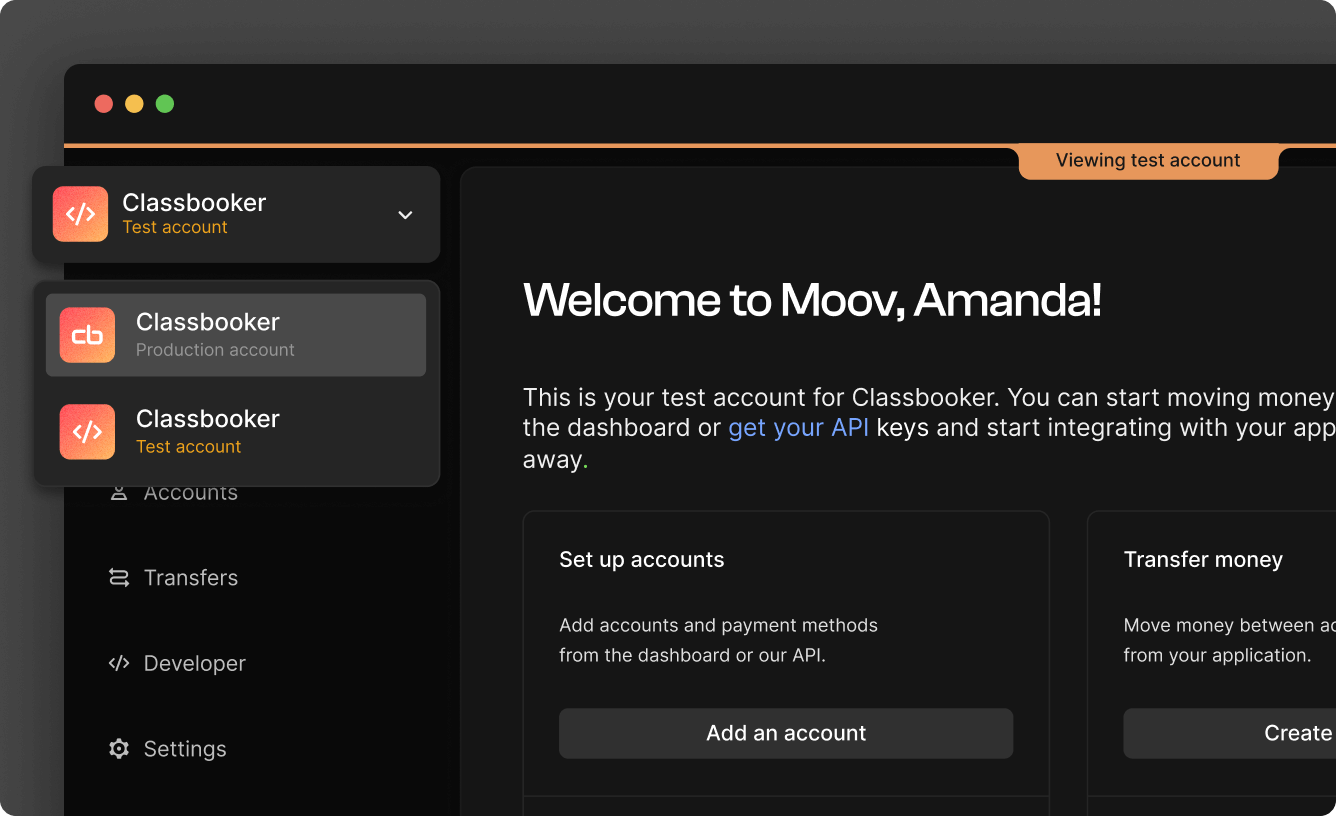
After you've completed your business profile and Moov has approved your production account, you can switch between production and test mode in the Moov Dashboard by using the Account dropdown in the upper left hand corner.
Invite team members
While in test mode, you can invite team members to your test account. Inviting team members to your test account does not enable them to use your production account. If you'd also like to invite team members to your production account, you will need to do that separately in production mode.
API keys
You will need to create an API key specific to the test account. We suggest naming the API key something that will help you remember that it's for testing purposes.
You can use localhost, ngrok, Netlify, or Vercel domains for these keys.
Transfers
Transfers in test mode won't move any real money. For the timing of transfers in test mode, note that:
- Wallet to wallet transfers complete almost instantly
- Weekday ACH transfers in test mode will complete in about an hour (see the processing speed guide for production mode). Weekend ACH transfers in test mode will not clear on Saturday or Sunday. Weekend ACH transfers wait for the first banking day cutoff (Monday 12:00 AM ET).
If you would like to see how Moov handles failures in production, view the transfer failures guide.
American Express transfers need to be a minimum of $1. In production mode, American Express transfers less than $1 will result in an error.
Test mode data
To simulate card transfers, disputes, ACH returns, RTP failures, bank account verification, and other transfer scenarios, use the test cards, amounts, and routing numbers in the test mode data reference.
Link cards & card acceptance
| Card brand | Test card number | CVV | Postal code | Expiration date | Card type |
|---|---|---|---|---|---|
| Visa | 4111111111111111 |
Any 3 numbers | Any 5 numbers | Any future date | Debit |
| Mastercard | 5555555555554444 |
Any 3 numbers | Any 5 numbers | Any future date | Debit |
| Discover | 6011233333330000 |
Any 3 numbers | Any 5 numbers | Any future date | Debit |
| American Express | 372021002000199 |
Any 4 numbers | Any 5 numbers | Any future date | Debit |
| Visa | 4111300030003000 |
Any 3 numbers | Any 5 numbers | Any future date | Credit |
| Mastercard | 5200900090009000 |
Any 3 numbers | Any 5 numbers | Any future date | Credit |
| Discover | 6011111111111117 |
Any 3 numbers | Any 5 numbers | Any future date | Credit |
| American Express | 371111111111114 |
Any 4 numbers | Any 5 numbers | Any future date | Credit |
See the postal and CVV sections below for additional test verification scenarios. Also note that test cards will expire once your chosen expiration date passes.
Name verification
The card link POST endpoint and PATCH endpoint offer an optional verifyName field, which uses Visa's ANI verification as a check against the supplied holderName. Use the following combinations of correct and incorrect names in the holderName field to test results.
Correct name: Alex Nora Irwin
| Name entered | Individual name check | Full name check |
|---|---|---|
| "Alex Nora Irwin" | match, match, match |
match |
| "Alex Noraa Irwin" | match, partialMatch, match |
match |
| "Alx Nora Irwin" | partialMatch, match, match |
match |
| "Alex Irwin" | match, notChecked, match |
match |
| "Irwin" | notChecked, notChecked, match |
match |
| "Alex Nor Irwin" | match, noMatch, match |
partialMatch |
| "Axely Nora Irwin" | noMatch, match, match |
partialMatch |
| "A N Irwi" | noMatch, noMatch, partialMatch |
noMatch |
| "Alex Notwin" | match, notChecked, noMatch |
noMatch |
| "Alex Notwin" | match, notChecked, noMatch |
noMatch |
If ANI is not supported, you'll receive unavailable for all results.
Postal code verification
| Card brand | Verification result | Postal code |
|---|---|---|
| All card brands | match |
11111 |
| All card brands | noMatch |
22222 |
| Visa, Discover | notChecked |
88888 |
| All card brands | unavailable |
99999 |
CVV verification
| Card brand | Verification result | CVV code |
|---|---|---|
| Visa, Mastercard, Discover | match |
111 |
| American Express | match |
1111 |
| Visa, Mastercard, Discover | noMatch |
222 |
| American Express | noMatch |
2222 |
| Visa, Mastercard, Discover | notChecked |
888 |
| American Express | notChecked |
8888 |
| Visa, Mastercard, Discover | unavailable |
999 |
| American Express | unavailable |
9999 |
Push & pull from card
| Card brand | Completed transfer | Failed transfer |
|---|---|---|
| Visa | 4111100010002000 |
4111100050007000 |
| Mastercard | 5200828282828210 |
5200821111111114 |
The expiration date can be any future date. CVV can be any 3 numbers for Visa and Mastercard. Since push and pull card transfers require verifications, test cards always return a successful match for CVV, postal code, and (if requested) name verification, regardless of the values provided. To test negative verification results, use the test values in the CVV verification, postal code verification, and name verification sections.
Tap to Pay
Test mode allows you to verify your Tap to Pay integration on iOS and Android before processing live payments. The terminal configuration fetched from the Moov API determines whether the SDK operates in test or production mode. When using a test configuration, the SDK simulates card tap scenarios using these test cards:
| Card brand | Test card number | Result |
|---|---|---|
| Visa | 4111111111111111 |
Approved |
| Mastercard | 5555555555554444 |
Approved |
| Discover | 6011111111111117 |
Approved |
| American Express | 371111111111114 |
Approved |
| Visa | 4000020000000000 |
Declined |
| Mastercard | 5555000022220022 |
Declined |
| Discover | 6011000022220002 |
Declined |
| American Express | 3711000022220002 |
Declined |
When testing Tap to Pay on mobile with test cards, you don't need to enter a CVV, expiration date, or postal code. For platform-specific details, refer to the SDK documentation:
Declined card transfers
| Card brand | Test card number | CVV |
|---|---|---|
| Visa | 4000020000000000 |
Any 3 numbers |
| Mastercard | 5555000022220022 |
Any 3 numbers |
| Discover | 6011000022220002 |
Any 3 numbers |
| American Express | 3711000022220002 |
Any 4 numbers |
RTP
To simulate an RTP transfer in test mode, create a transfer with moov-wallet as the source payment method and rtp-credit as the destination. The rtp-credit payment method only appears for bank accounts with routing numbers that are RTP eligible.
Use 021000021 as an RTP-enabled routing number in test mode.
You can simulate RTP failures and rejections by using these specific transfer amounts. These amounts result in real time failures and the linked bank account entering an errored state.
| Transfer amount | Failure type |
|---|---|
| $72.03 | AC03 / invalid-account |
| $72.04 | AC04 / account-closed |
| $72.06 | AC06 / account-blocked |
If you would prefer to use the API to simulate a failure, you can trigger the RTP failure in test mode by entering any of the return amount codes as the value. For example, to simulate an invalid account, enter 7203 as the value.
{
  "amount": {
    "currency": "USD",
    "value": 7203
  }
}
Surcharge fees
To simulate surcharge fees, use the following test credit cards.
| Card brand | Test card number | CVV | Postal code | Expiration date |
|---|---|---|---|---|
| Visa | 4111300030003000 |
Any 3 numbers | Any 5 numbers | Any future date |
| Mastercard | 5200900090009000 |
Any 3 numbers | Any 5 numbers | Any future date |
| Discover | 6011111111111117 |
Any 3 numbers | Any 5 numbers | Any future date |
| American Express | 371111111111114 |
Any 4 numbers | Any 5 numbers | Any future date |
Note that when processing surcharge fees on credit cards in production, you must follow card brand caps, as well as additional card network rules and state and federal regulations. Accounts must contact Moov to enable surcharging.
See the surcharge guide for more information.
ACH returns
You can simulate a few ACH return scenarios during different transfer stages. Trigger ACH returns in test mode by entering any of the return amount codes listed below as the value when creating a transfer. For example, to simulate insufficient funds, enter 5501 as the value.
| Trigger Amount | Return Code | Description | Simulation Stage |
|---|---|---|---|
| $55.01 | R01 |
Insufficient Funds | Debit originated, not completed |
| $55.02 | R02 |
Account Closed | Debit originated, not completed |
| $55.03 | R03 |
No Account / Unable to Locate | Credit completed |
| $55.04 | R04 |
Invalid Account Number Structure | Credit completed |
| $55.07 | R07 |
Authorization Revoked by Customer | Debit completed |
| $55.08 | R08 |
Payment Stopped | Debit completed |
| $55.09 | R09 |
Uncollected Funds | Debit originated, not completed |
| $55.10 | R10 |
Customer Not Authorized | Debit completed |
| $55.11 | R11 |
Entry Not in Accordance with Terms | Debit originated, not completed |
| $55.15 | R15 |
Account Holder Deceased | Debit originated, not completed |
| $55.16 | R16 |
Account Frozen | Debit originated, not completed |
| $55.20 | R20 |
Non-Transaction Account | Debit originated, not completed |
| $55.24 | R24 |
Duplicate Entry | Debit originated, not completed |
| $55.29 | R29 |
Corporate Customer Not Authorized | Debit originated, not completed |
{
  "amount": {
    "currency": "USD",
    "value": 5501
  }
}
A return is only triggered if the transfer type (for example, wallet-to-bank) is applicable to the particular return scenario and amount entered. For example, an R01 in test mode always occurs on the debit leg, after the transfer stage of debit origination. Accordingly, an R01 return cannot be triggered on a wallet-to-bank transfer, as that transfer type only consists of a credit leg. Creating a return scenario that does not apply to a corresponding transfer type results in a regular test transfer, not a test return.
Once you have created a transfer with an appropriate return code, Moov updates the transfer to failed or reversed based on the transfer stage (see ACH returns and exceptions for more information). The bank account status is also updated accordingly.
Disputes
| Card brand | Test card number | Phase | Reason code |
|---|---|---|---|
| Visa | 4000200020002000 |
Chargeback | 10.4 |
| Visa - Pull from card | 4111100010003008 |
Chargeback | 10.4 |
| Mastercard | 5555444400004444 |
Chargeback | 4860 |
| Mastercard - Pull from card | 5555555555553339 |
Chargeback | 4860 |
| Discover | 6011222222220000 |
Chargeback | 05 |
| American Express | 371010002000123 |
Chargeback | F29 |
| American Express | 372020002000188 |
Inquiry | 21 |
Dispute evidence
| Text evidence | Phase | Outcome |
|---|---|---|
winning-evidence |
chargeback |
Dispute will enter an under-review status for 10 minutes before updating to status: won. The chargeback is reversed and funds are credited to the merchant. |
winning-evidence |
inquiry |
Dispute will enter an under-review status for 10 minutes before updating to status: closed. |
losing-evidence |
chargeback |
Dispute will enter an under-review status for 10 minutes before updating to status: lost. |
losing-evidence |
inquiry |
Dispute will enter an under-review status for 10 minutes before updating to status: response-needed. |
Bank accounts
| Data | Description |
|---|---|
| Routing number | Requires a valid routing number. Example: 322271627 |
| Account number | The account number can be any number. Example: 12345654321 |
| Instant verification code | 0001 |
| Micro-deposits | 0,0 |
To simulate an instant micro-deposit verification in test mode, enter 0001 as the instant verification code.
To simulate traditional micro-deposit verification in test mode, enter 0 for both amounts: [0,0], and the bank account verification will succeed. If you input any other amount, the bank account verification won't complete.
Plaid
To test linking bank accounts with Plaid, pass env: "sandbox" into the payload in the Moov.js initialization. You can pass any token as the processor token and Moov links default account data:
  RoutingNumber: "011401533",
  AccountNumber: "1111222233330000",
  AccountType:   "checking",
  Mask:          "0000"
Spending card simulations
Simulate spending card authorizations, clearings, and reversals in test mode with Moov's API.
Authorization
Use the authorization simulation endpoint to simulate a spending card authorization.
Pass the accountID for the business account for which the spending card was issued. The body must include an amount and issuedCardID. Optionally, you can pass merchantData.
curl -X POST "https://api.moov.io/issuing/simulations/{accountID}/authorizations" \
  -H "Authorization: Bearer {token}" \
  -H "X-Moov-Version: v2026.10.00" \
  -d '{
  "amount": "50.00",
  "issuedCardID": "d04885c9-ea6b-43a7-9186-63d9fbd57716",
  "merchantData": {
    "networkID": "123456789012345",
    "name": "Whole Body Fitness",
    "city": "San Francisco",
    "country": "US",
    "postalCode": "94107",
    "state": "CA",
    "mcc": "7298"
  }
}'
Clearing
Use the clearing simulation endpoint to simulate a spending card clearing.
Pass the accountID for the business account for which the spending card was issued and the authorizationID of the authorization to clear.
curl -X POST "https://api.moov.io/issuing/simulations/{accountID}/authorizations/{authorizationID}/clearings" \
  -H "Authorization: Bearer {token}" \
  -H "X-Moov-Version: v2026.10.00" \
  -d '{
  "amount": "50.00"
}'
Reversal
Use the reversal simulation endpoint to simulate a spending card reversal.
Pass the accountID for the business account for which the spending card was issued and the authorizationID of the authorization to reverse.
curl -X POST "https://api.moov.io/issuing/simulations/{accountID}/authorizations/{authorizationID}/reversals" \
  -H "Authorization: Bearer {token}" \
  -H "X-Moov-Version: v2026.10.00" \